How do I add a timestamp to photos as I take them?
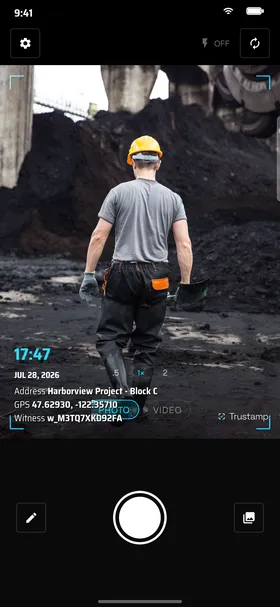
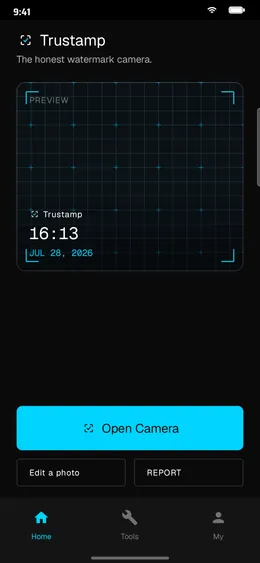
Open Trustamp on Android, choose a watermark template and check the date, time and location in the preview. Adjust the stamp size and position, then take your photo. This workflow adds the timestamp at capture; it does not establish when an older imported photo was originally taken.
Can I use Trustamp as a GPS camera without ads?
Yes. Trustamp has no ads and requires no account to start. Enable location permission to include GPS details and choose a template with a map if you need one. See the GPS map camera guide for available location fields.
Can I make a PDF report from my work photos?
Yes. Select photos in the gallery, add notes and export a PDF photo report. You can share it for a delivery handoff, maintenance visit or property inspection. See how photo reports work.
How is Trustamp different from Timemark?
Two big differences. (1) Trustamp is built for the open C2PA standard: turn on C2PA and any tool — Adobe Photoshop, Chrome, third-party verifiers — can independently verify your photo's Content Credential (our issuer certification is still in progress, so tools confirm the credential's integrity but flag the issuer as not-yet-trusted). A public verify link already lets anyone check a photo's time and place without our site. Timemark uses a closed system where verification only happens on their website. (2) Trustamp lets you refine GPS at the doorplate level (country/city/street are locked), while Timemark doesn't allow GPS correction at all — a top complaint in their one-star reviews.
What does "witnessing" a photo actually do?
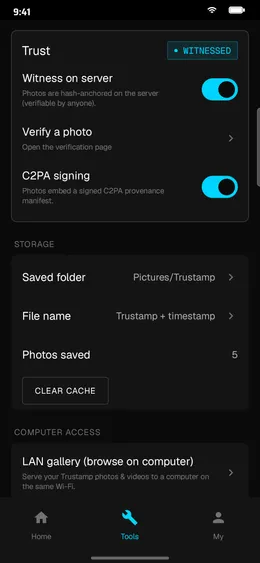
When you witness a shot, Trustamp sends a tiny time + location ping to our server — a few hundred bytes, no photo and no fingerprint of it. The trick: the witness code is issued by our server before you take the photo and is shown in the watermark, so the capture can't predate it. That gives an unforgeable, server-anchored answer to when and where — the part a phone clock or a screenshot can't be trusted for.
Can I edit photos after taking them?
Yes — but only in Watermark mode, which gives you full creative control with no verification claim. In Witness mode, the time and place are anchored from capture (and, with C2PA on, the image content is sealed too). You can still refine the address text within the GPS-derived street boundary, and every refinement is transparently noted.
How do you prove my photo wasn't tampered with?
Two independent layers. (1) Time and place: the witness record is signed with our server-held key and bracketed by a code issued before capture — we can prove we anchored it, and it can't be back-dated. (2) The image itself: turn on C2PA and the JPEG carries an open Content Credential, so any C2PA-aware tool (Adobe Verify, Chrome) can confirm the pixels weren't edited. Our C2PA issuer certification is in progress, so tools read the credential and confirm its integrity today, and will show the issuer as trusted once Trust List certification completes.
Does it work offline?
Yes. Photos and watermarks are generated entirely on-device. The "witness" step queues if offline and uploads when connectivity returns. The credential timestamp uses the time of the original capture (witnessed when you get back online), so off-grid shoots aren't penalized.
What happens to the C2PA manifest when I share on social media?
Honestly? Instagram, X, WeChat, and most platforms strip metadata on upload, so an embedded C2PA Content Credential can be lost there. That's why we lead with the route that always works: a public trustampcamera.com/verify link for the time and place, which holds up on any platform even after compression. When you keep the original file (email, Dropbox, AirDrop, Adobe tools), the embedded C2PA credential adds tool-native image verification on top.
Which tools can read a Trustamp photo's credentials?
Turn on C2PA and, because Trustamp uses the open C2PA standard, the Content Credential in your JPEG is readable by any C2PA-aware tool — without using Trustamp at all:
- Adobe Verify — verify.contentauthenticity.org (drag-and-drop)
- Chrome / Edge built-in — automatic Content Credentials badge on supported images (2025+)
- Adobe Photoshop / Lightroom — File → Content Credentials panel
- iOS Photos / Google Photos / Samsung Gallery — system-level C2PA viewer (2025+)
- LinkedIn / TikTok / Threads — automatic Content Credentials badge on upload
- c2patool CLI — Adobe's open-source command-line verifier
- Our own
trustampcamera.com/verify/<id> — the public route, even after platforms strip EXIF
Important: issuer trust tier. Trustamp's signing certificate is currently self-issued — our C2PA Trust List application is in progress. This means the tools above read the credentials fine, but mark the issuer as "untrusted" until our Trust List inclusion. Timemark photos, by contrast, can only be verified on timemark.com — there's no open standard, no cross-tool reading, no independent verification.